Dask
Dask is created to enhance Python performance by using distributed computing. To do so, Dask offers a list of libraries that mimics the popular data science tools such as numpy and pandas. For instance, Dask arrays organize Numpy arrays, break them into chunks to complete the computation process in a parallel fashion. As a result, large dataset can be processed using multiple nodes as opposed to the typical single node resource. This article describes the behavioural outcome in terms of speed and CPU utilization when using Dask arrays with different chunk sizes.
The following experiments are carried out using Jupyterlab notebook in Cloudera Machine Learning (CML) on the Kubernetes platform powered by Openshift 4.8 with the hardware specification as described below. Here's the link to download the complete notebook.
| CPU | Intel(R) Xeon(R) Gold 5220R CPU @ 2.20GHz | | Memory | DIMM DDR4 Synchronous Registered (Buffered) 2933 MHz (0.3 ns) | | Disk | SSD P4610 1.6TB SFF |
Dask with Single Worker Pod
-
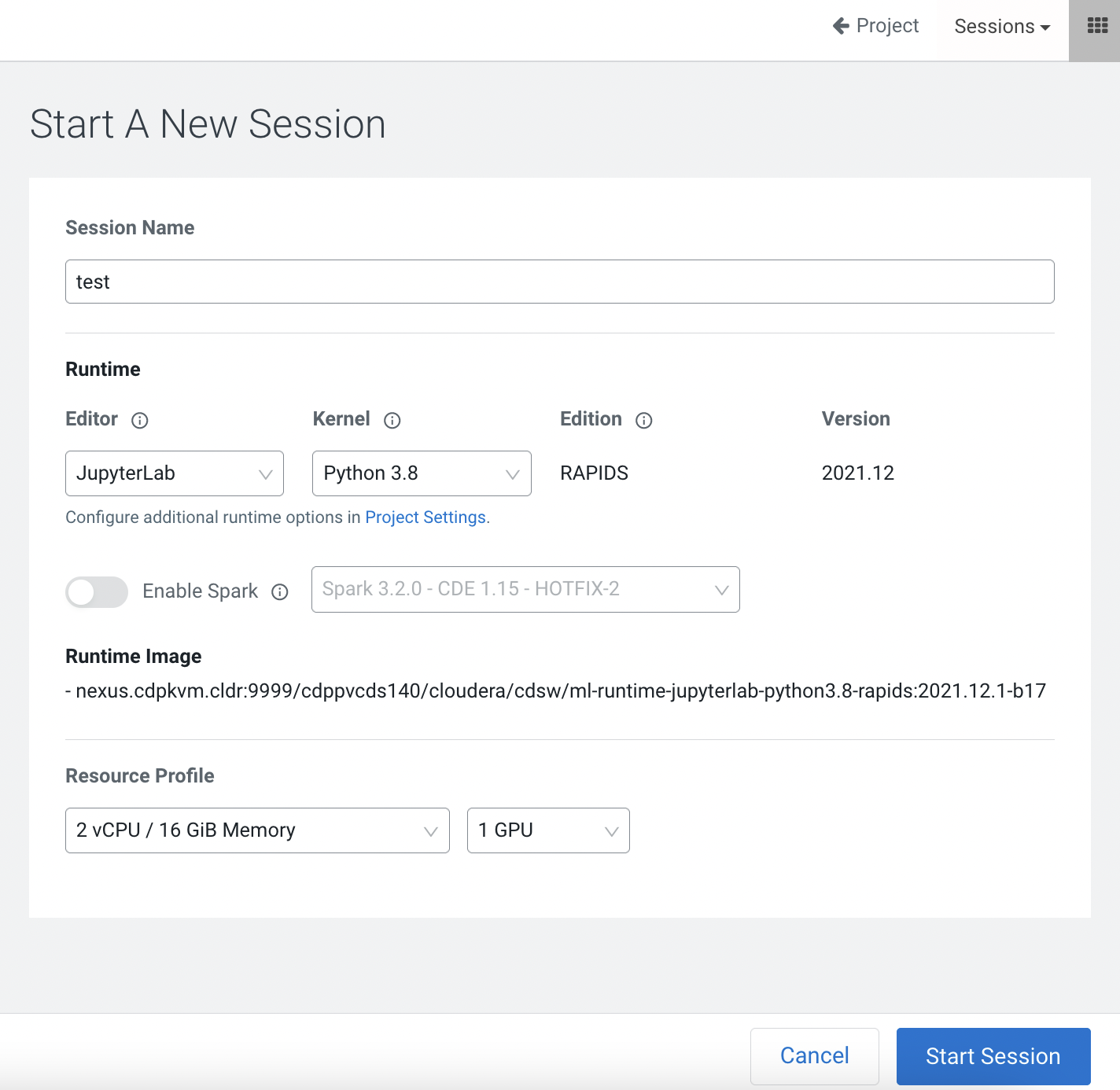
Create a Jupyterlab session with 2 CPU/16 GiB memory profile.
-
Create a simple dask array with 100000 chunks.
import dask.array as da
arrayshape = (200000, 200000)
chunksize = (2000, 2000)
x = da.ones(arrayshape, chunks=chunksize)
x
|
-
Add the values of the array and take note of the completion time.
from dask.diagnostics import ProgressBar
big_calc = (x * x[::-1, ::-1]).sum()
with ProgressBar():
    result = big_calc.compute()
print(f"Total size: {result}")
[########################################] | 100% Completed | 42.8s Total size: 40000000000.0
-
Restart the kernel. Create the same array shape with smaller number of chunks.
# Restart kernel
# Take shorter duration to complete with smaller number (400) of chunks.

import dask.array as da
arrayshape = (200000, 200000)
chunksize = (10000, 10000)
x = da.ones(arrayshape, chunks=chunksize)
x
|
-
Add the values of the array and take note of the completion time.
from dask.diagnostics import ProgressBar
big_calc = (x * x[::-1, ::-1]).sum()
with ProgressBar():
    result = big_calc.compute()
print(f"Total size: {result}")
[########################################] | 100% Completed | 26.9s Total size: 40000000000.0
-
By default, Dask does automatic chunking. Find out the chunk size created by the system.
# Restart kernel
# Allow automatic assignment of chunks. The system assigns 2500 tasks in this example.

import dask.array as da
arrayshape = (200000, 200000)
x = da.ones(arrayshape)
x
|
-
Add the values of the array based on the chunk size created by Dask. Take note of the completion time.
from dask.diagnostics import ProgressBar
big_calc = (x * x[::-1, ::-1]).sum()
with ProgressBar():
    result = big_calc.compute()
print(f"Total size: {result}")
[########################################] | 100% Completed | 35.2s Total size: 40000000000.0
-
Restart the kernel. This time, create the same array shape with higher chunk size.
import dask.array as da
arrayshape = (200000, 200000)
chunksize = (20000, 20000)
x = da.ones(arrayshape, chunks=chunksize)
x
|
-
Perform the same computation but the the kernel crashes due to insufficient memory (more than 16G is needed for such chunk size).
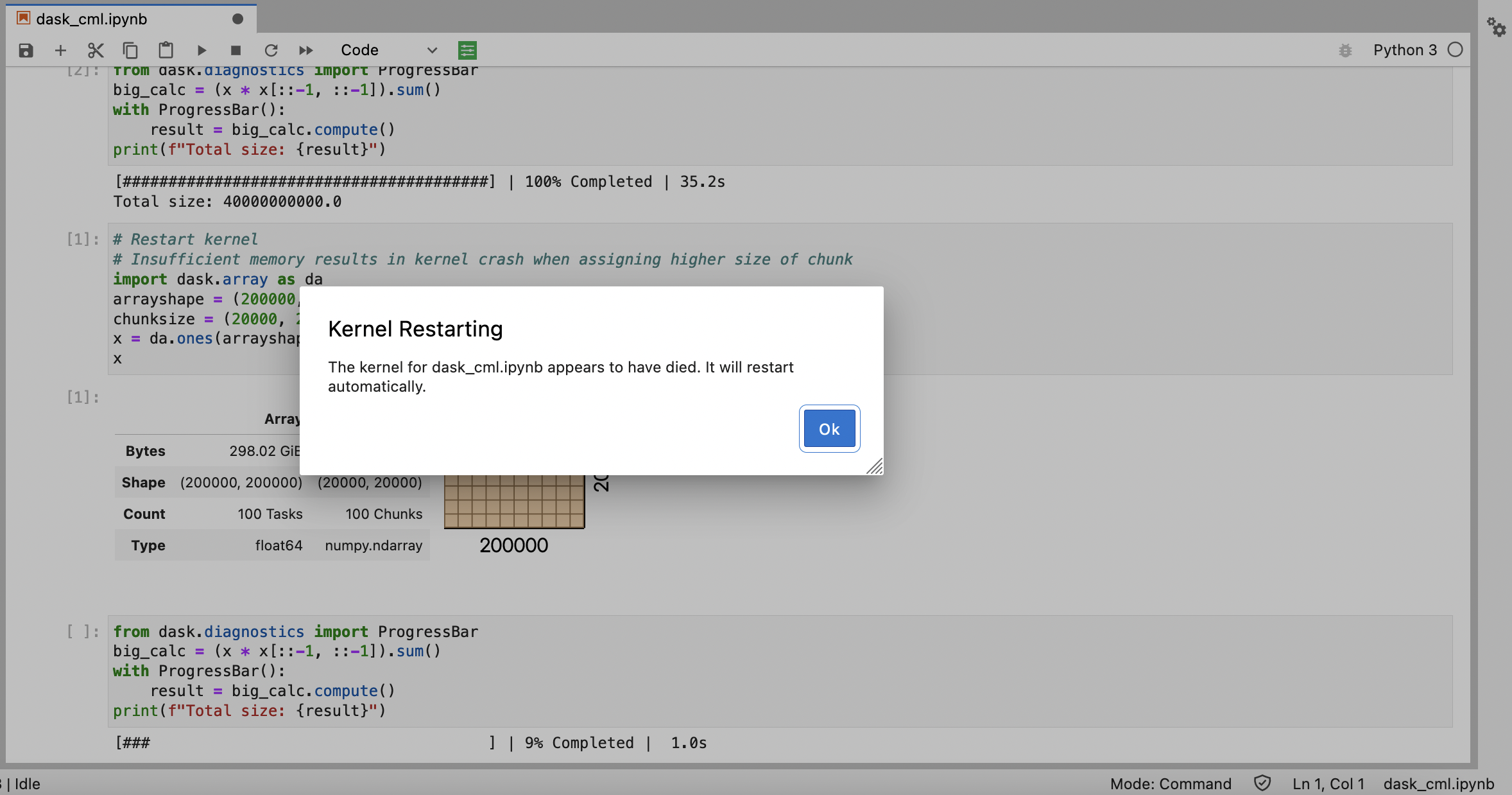
from dask.diagnostics import ProgressBar
big_calc = (x * x[::-1, ::-1]).sum()
with ProgressBar():
    result = big_calc.compute()
print(f"Total size: {result}")
[### ] | 9% Completed | 1.0s
-
Restart the kernel. Create the same array shape and allow Dask to assign the chunk size automatically.
import dask.array as da
arrayshape = (200000, 200000)
x = da.ones(arrayshape)
x
|
-
Automatic assignment of chunks by the system allows computation to complete without encountering insufficient memory problem.
from dask.diagnostics import ProgressBar
big_calc = (x * x[::-1, ::-1]).sum()
with ProgressBar():
    result = big_calc.compute()
print(f"Total size: {result}")
[########################################] | 100% Completed | 35.8s Total size: 40000000000.0
-
Restart the kernel. Create a distributed Dask with task scheduler pod.
import os import time import cdsw import dask dask_scheduler = cdsw.launch_workers( n=1, cpu=2, memory=2, code=f"!dask-scheduler --host 0.0.0.0 --dashboard-address 127.0.0.1:8090", ) # Wait for the scheduler to start. time.sleep(10) -
Obtain the Dask URL and access the DASK UI portal.
print("//".join(dask_scheduler[0]["app_url"].split("//")))http://zusu97y7pconcrlc.ml-76cf996d-8f4.apps.apps.ocp4.cdpkvm.cldr/
-
Take note of the Dask scheduler URL.
scheduler_workers = cdsw.list_workers()
scheduler_id = dask_scheduler[0]["id"]
scheduler_ip = [
    worker["ip_address"] for worker in scheduler_workers if worker["id"] == scheduler_id
][0]

scheduler_url = f"tcp://{scheduler_ip}:8786"
scheduler_url
'tcp://10.254.0.98:8786'
-
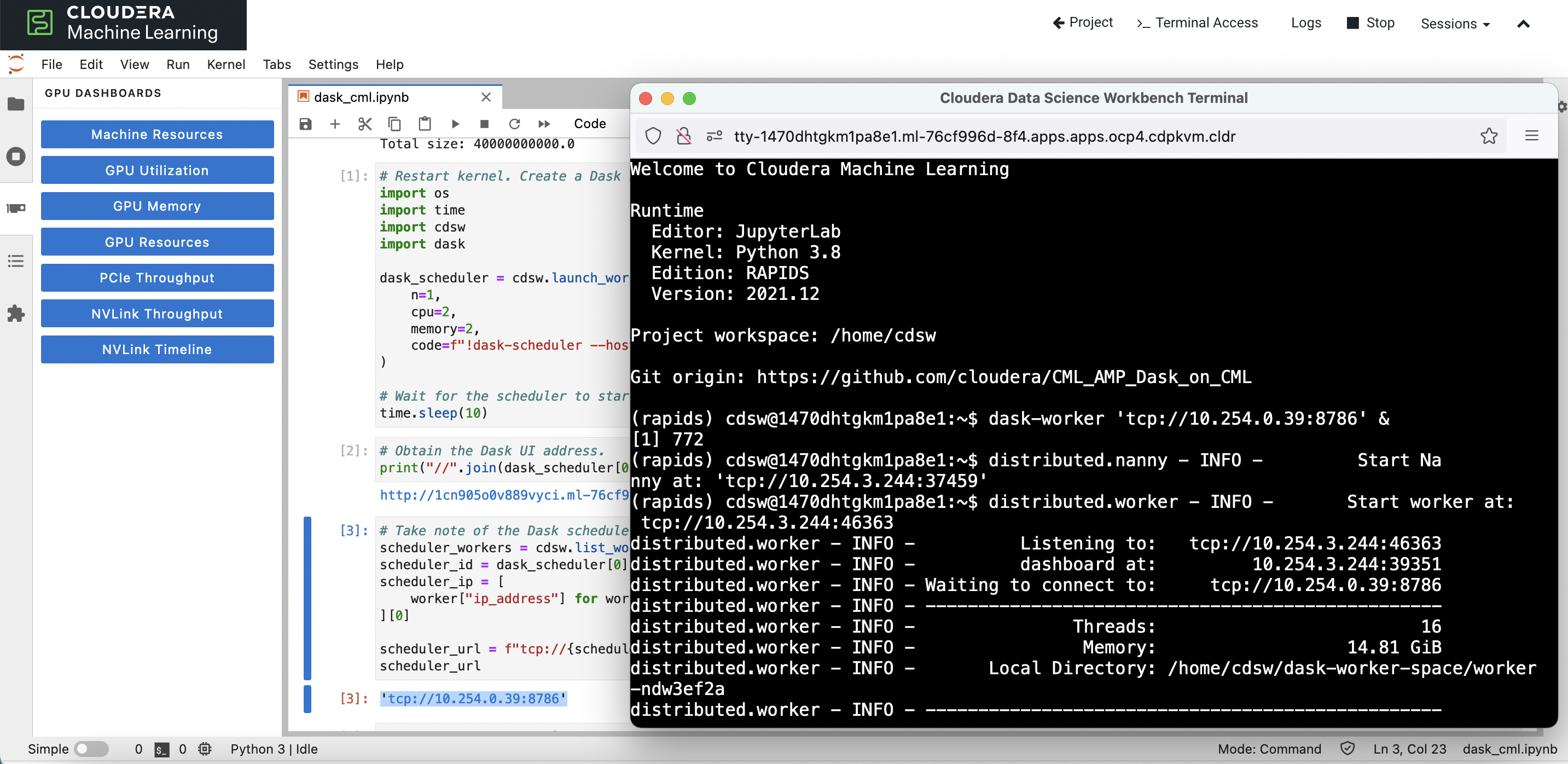
Open the terminal of the CML pod and start the dask-worker command connecting the above Dask scheduler.
-
Verify that 1 worker node is currently attached to the Dask cluster.
from dask.distributed import Client
client = Client(scheduler_url)
client
```xml
Client
Client-52dd6bb3-545b-11ed-8245-0a580afe03f4
| Connection method: Direct | |
| Dashboard: http://10.254.0.39:8090/status |
Scheduler Info
Scheduler
Scheduler-fb942c81-40ea-48f1-a0fa-02aaee940ac1
Comm: tcp://10.254.0.39:8786 | Workers: 1 |
| Dashboard:http://10.254.0.39:8090/status | Total threads: 16 |
Started: 2 minutes ago | Total memory: 14.81 GiB |
Workers
Worker: tcp://10.254.3.244:46363
Comm: tcp://10.254.3.244:46363 | Total threads: 16 |
| Dashboard: http://10.254.3.244:39351/status | Memory: 14.81 GiB |
Nanny: tcp://10.254.3.244:37459 | |
Local directory: /home/cdsw/dask-worker-space/worker-ndw3ef2a | |
GPU: NVIDIA A100-PCIE-40GB | GPU memory: 39.59 GiB |
Tasks executing: 0 | Tasks in memory: 0 |
Tasks ready: 0 | Tasks in flight: 0 |
CPU usage: 8.0% | Last seen: Just now |
Memory usage: 130.37 MiB | Spilled bytes: 0 B |
Read bytes: 33.51 kiB | Write bytes: 48.61 kiB |
-
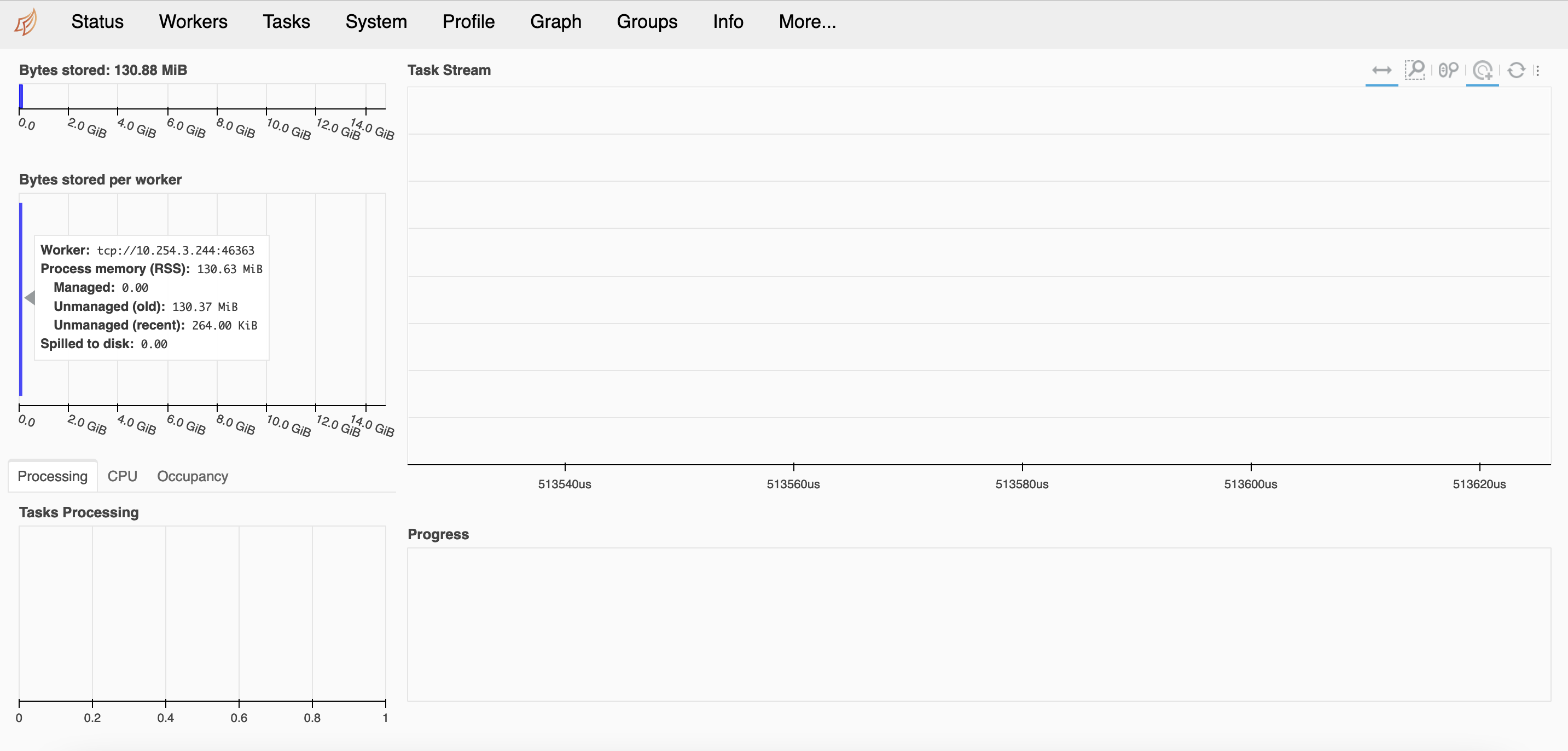
Dask UI shows that 1 worker node is currently connected to the Dask cluster.
-
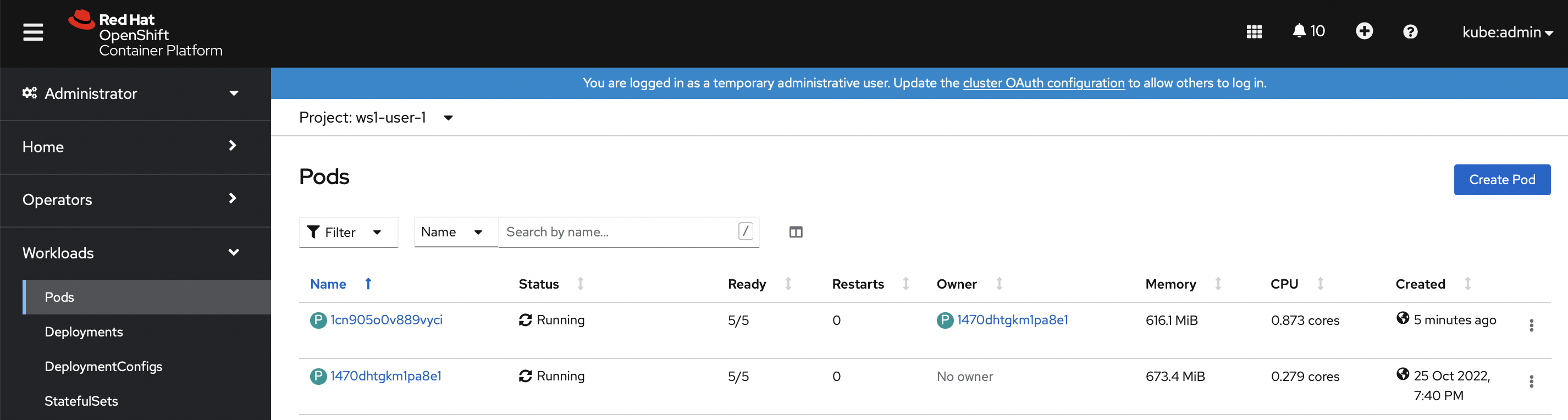
Openshift dashboard depicts 1 Dask scheduler pod and 1 Dask worker pod (CML session pod) are currently up and running.
-
Create the Dask array without specifying the chunk size.
import dask.array as da
arrayshape = (200000, 200000)
x = da.ones(arrayshape)
x
```xml
|
-
Run the same array sum() computation and check the completion time.
%%time big_calc = (x * x[::-1, ::-1]).sum() result = big_calc.compute() print(f"Total size: {result}") ```sql Total size: 40000000000.0 CPU times: user 2.17 s, sys: 641 ms, total: 2.81 s Wall time: 9min 3s -
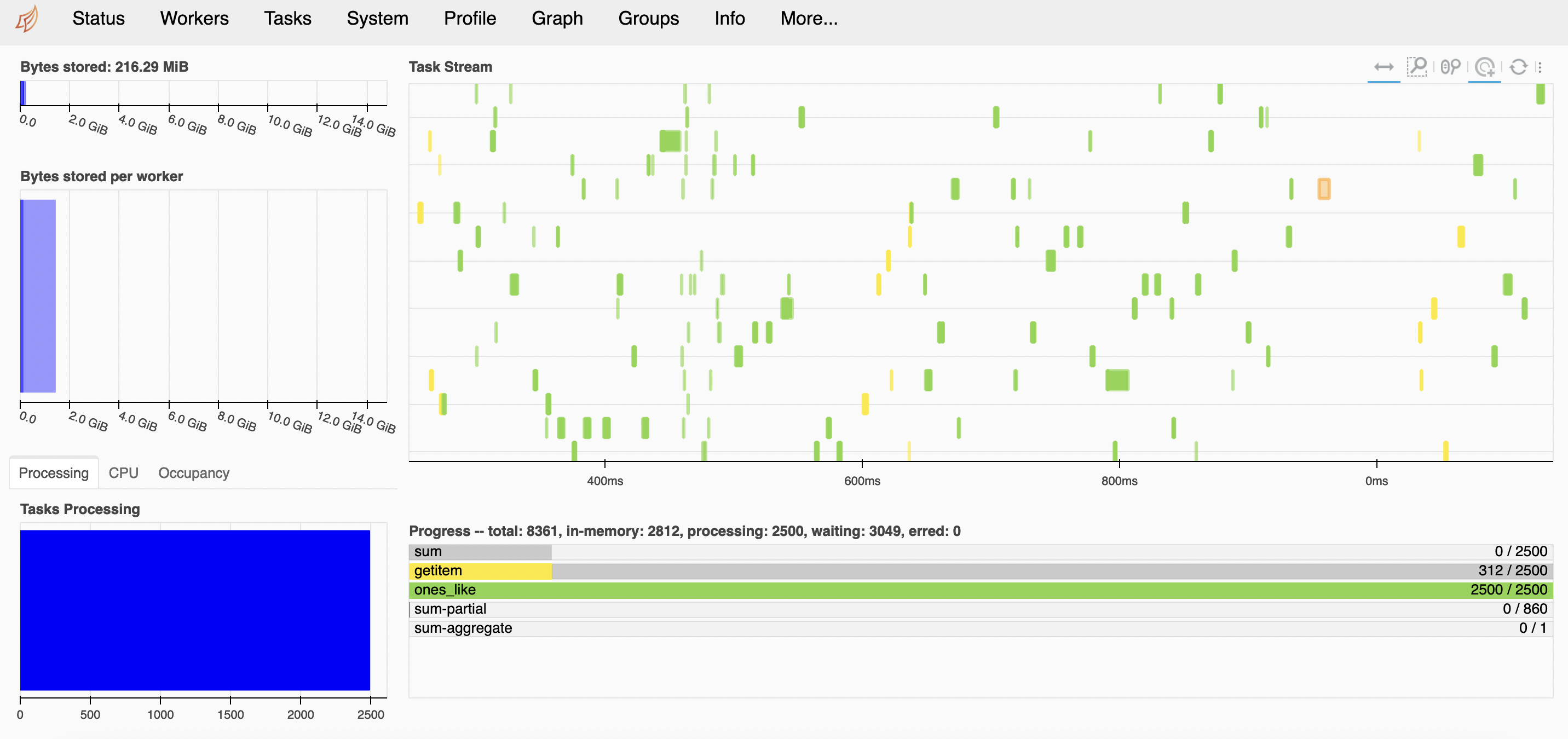
Dask UI displays the execution of the tasks.
-
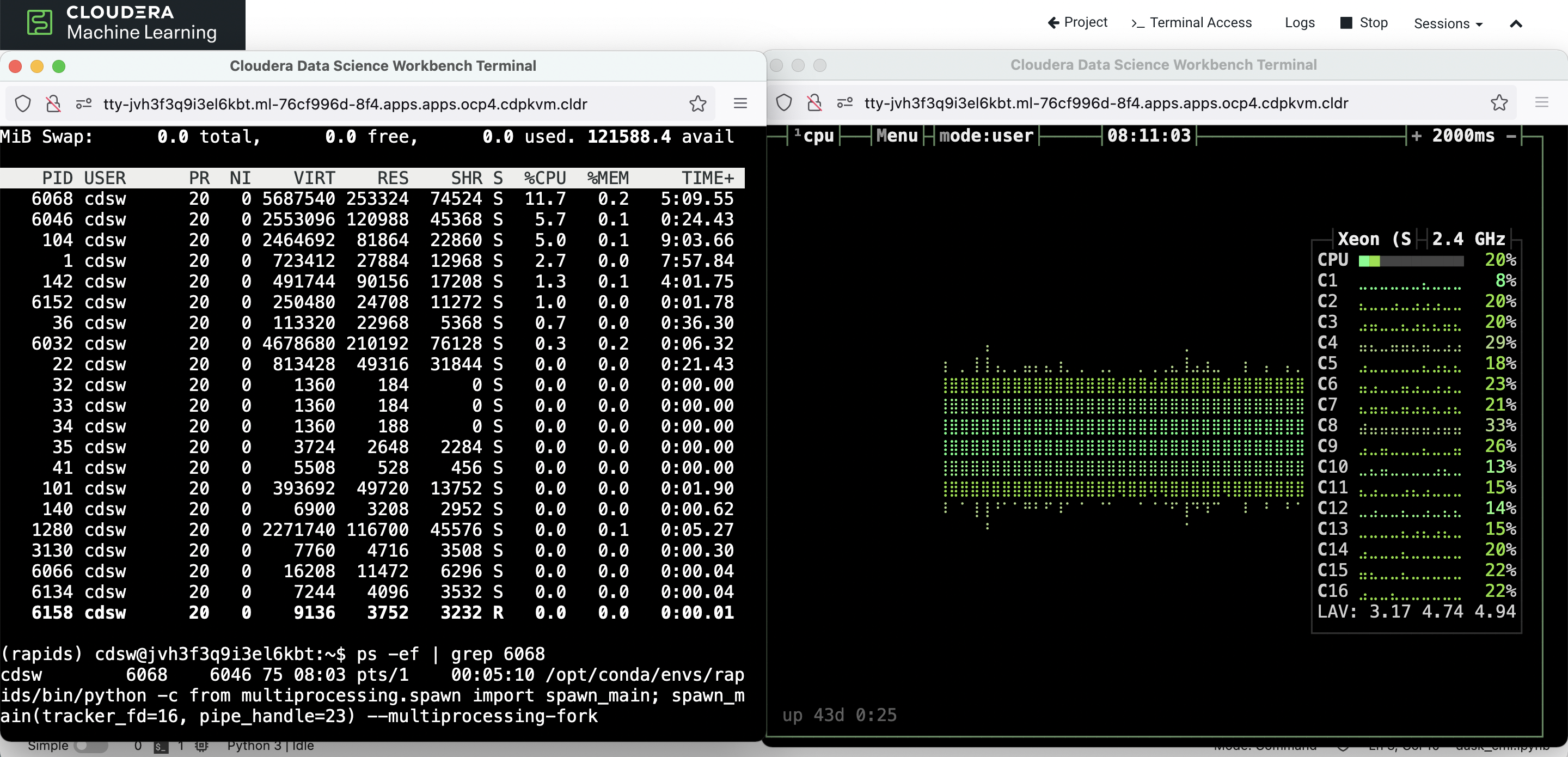
Take note of the CPU utilization (using bpytop) when the above computation takes place.
-
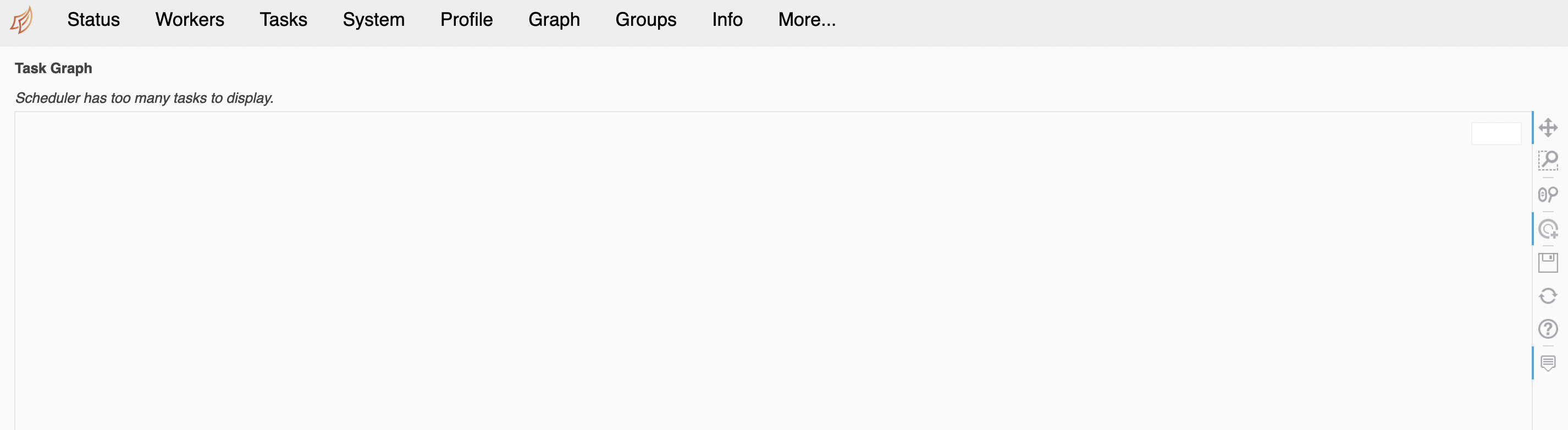
Dask UI is unable to depict the graph due to too many Dask tasks/chunks in place.
-
Next, create the same array shape with higher chunk size.
import dask.array as da
arrayshape = (200000, 200000)
chunksize = (10000, 10000)
x = da.ones(arrayshape, chunks=chunksize)
x
```xml
|
-
Run the same sum() computation and check the completion time.
%%time big_calc = (x * x[::-1, ::-1]).sum() result = big_calc.compute() print(f"Total size: {result}") ```text Total size: 40000000000.0 CPU times: user 685 ms, sys: 253 ms, total: 937 ms Wall time: 3min 55s -
Time time, Dask UI is able to depict the graph with higher chunk size (smaller number of chunks).
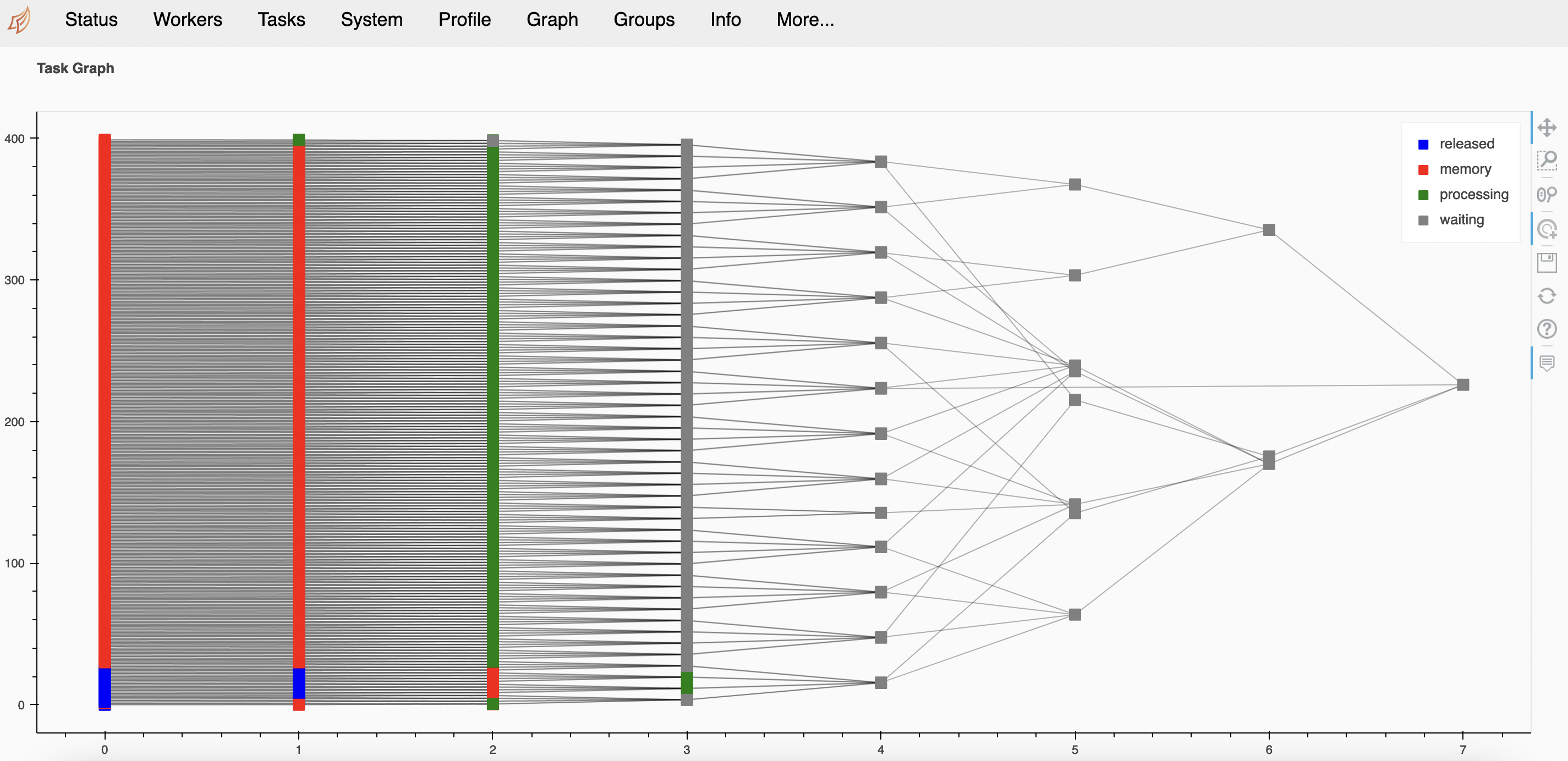
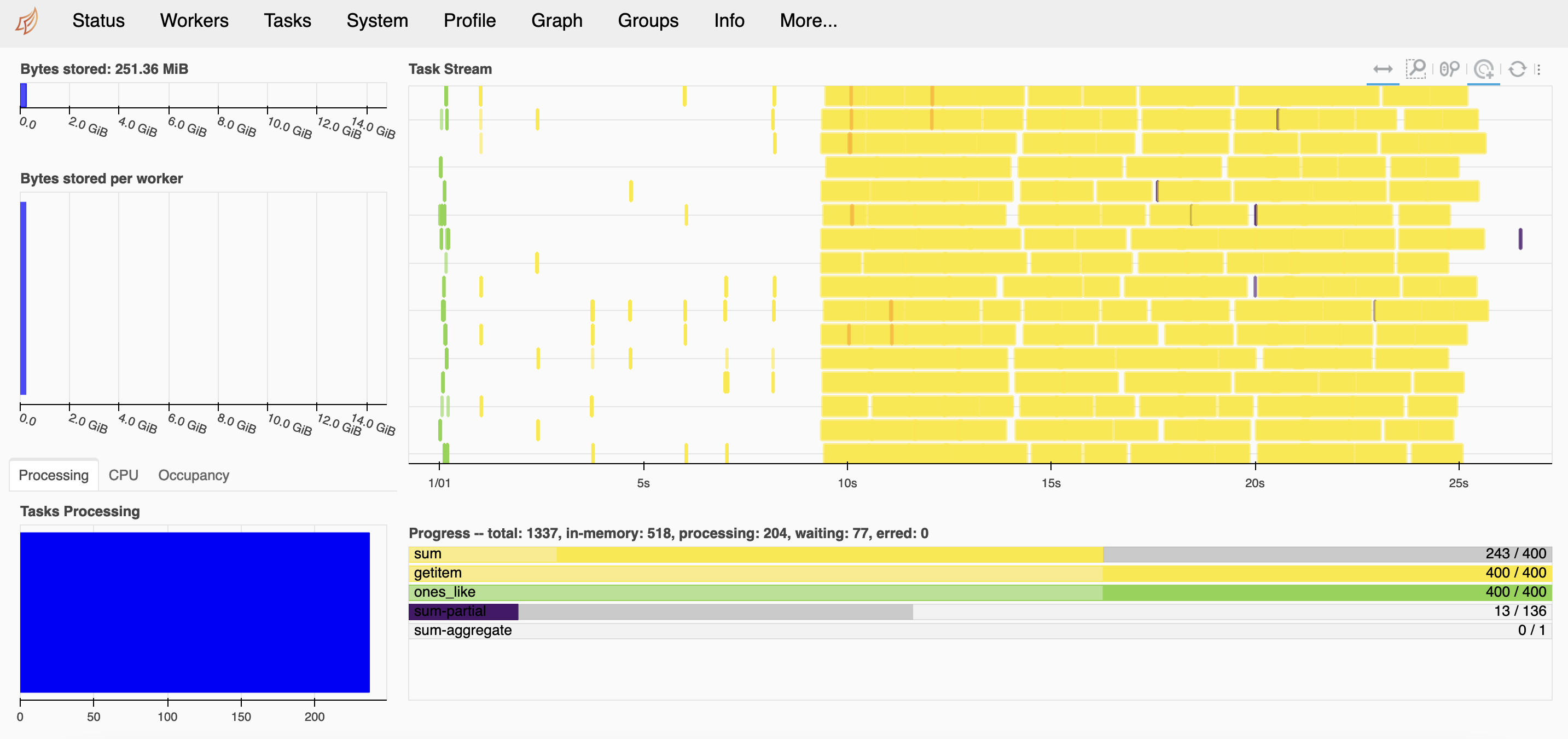
-
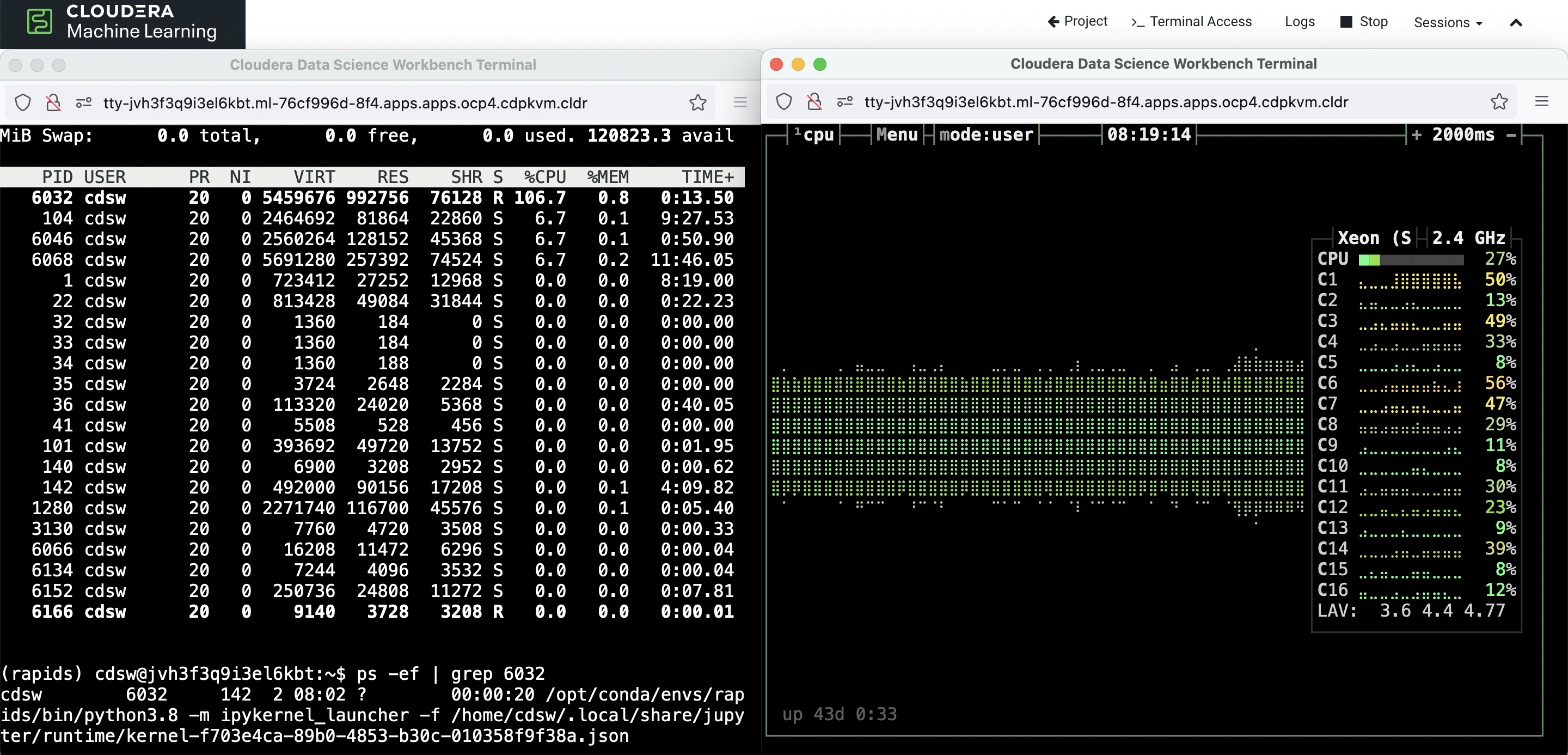
Dask allows scheduler to be defined specfically. Let's assign 'single-threaded' scheduler and run the same computation.
# Assigning scheduler "single-threaded" doesn't trigger Dask-worker? %time big_calc = (x * x[::-1, ::-1]).sum().compute(scheduler='single-threaded') print(f"Total size: {big_calc}") ```text CPU times: user 1min 23s, sys: 1min 54s, total: 3min 18s Wall time: 3min 17s Total size: 40000000000.0 -
The CPU utilization graph shows that 'single-threaded' scheduler uses a single CPU core but not using Dask-worker.
-
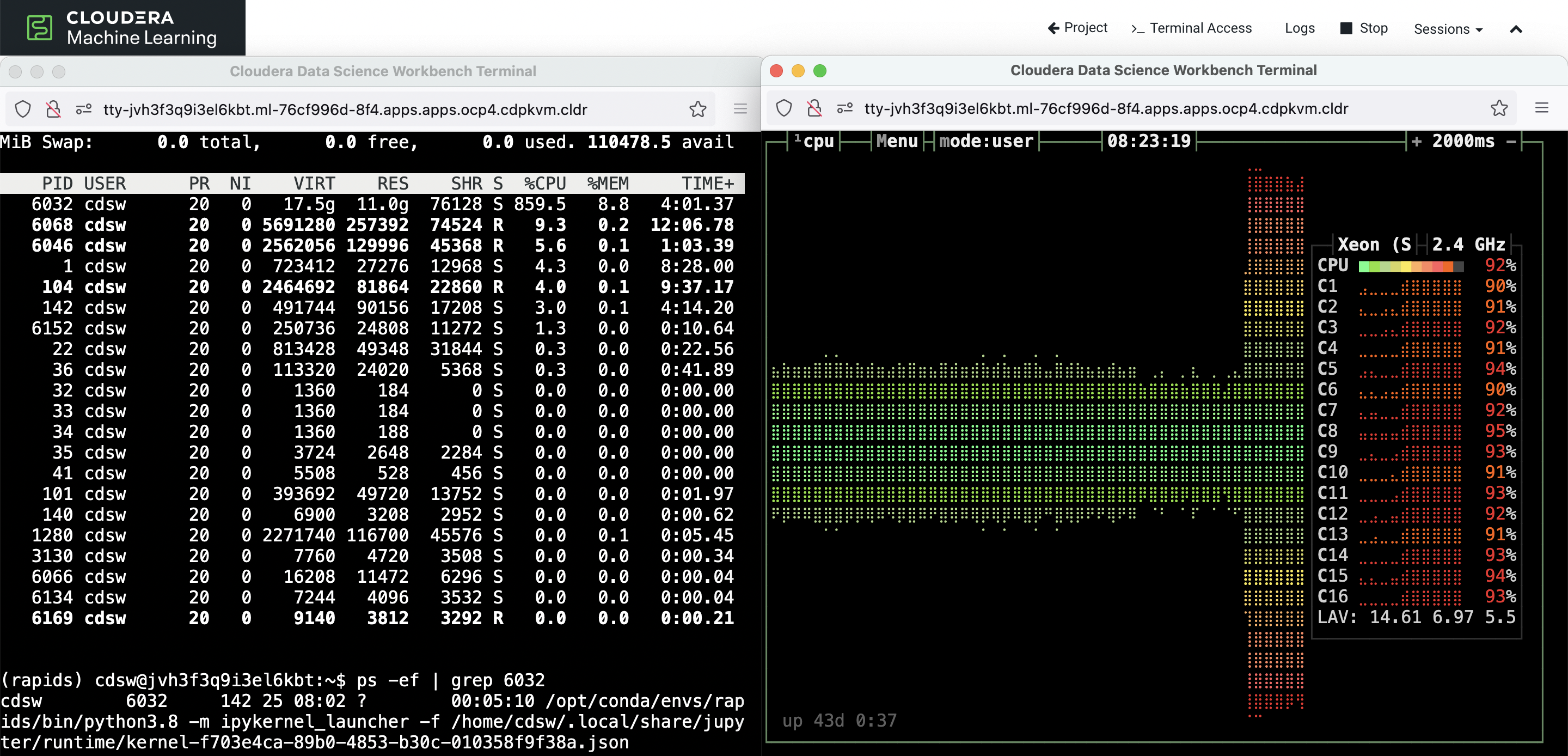
Now let's assign 'threads' scheduler and run the same computation.
%%time big_calc = (x * x[::-1, ::-1]).sum().compute(scheduler='threads') print(f"Total size: {big_calc}") ```sql Total size: 40000000000.0 CPU times: user 3min 2s, sys: 2min 47s, total: 5min 50s Wall time: 26.9 s -
The CPU utilization graph shows that 'threads' scheduler uses all the available CPU cores in the hosting node to complete the tasks. It doesn't use Dask-worker.
Dask with Multiple Worker Pods
-
Restart the kernel and create a new Dask cluster.
import os
import time
import cdsw
import dask

dask_scheduler = cdsw.launch_workers(
    n=1,
    cpu=2,
    memory=2,
    code=f"!dask-scheduler --host 0.0.0.0 --dashboard-address 127.0.0.1:8090",
)

# Wait for the scheduler to start.
time.sleep(10)
```text
# Obtain the Dask UI address.
print("//".join(dask_scheduler[0]["app_url"].split("//")))
```text
http://agfeuy4lgg17kf6f.ml-76cf996d-8f4.apps.apps.ocp4.cdpkvm.cldr/
```python
scheduler_workers = cdsw.list_workers()
scheduler_id = dask_scheduler[0]["id"]
scheduler_ip = [
worker["ip_address"] for worker in scheduler_workers if worker["id"] == scheduler_id
][0]
scheduler_url = f"tcp://{scheduler_ip}:8786"
scheduler_url
```sql
'tcp://10.254.0.116:8786'
- Create 3 new CML worker pods attach them to the Dask cluster.
```python
# Assign 3 worker nodes to the Dask cluster.
more_worker = 3
dask_workers = cdsw.launch_workers(
n=more_worker,
cpu=2,
memory=32,
code=f"!dask-worker {scheduler_url}",
)
# Wait for the workers to start.
time.sleep(10)
```text
```python
from dask.distributed import Client
client = Client(scheduler_url)
client
```xml
<div>
<div style={{width: "24px", height: "24px", backgroundColor: "#e1e1e1", border: "3px solid #9D9D9D", borderRadius: "5px", position: "absolute"}}> </div>
<div style={{marginLeft: "48px"}}>
<h3 style={{marginBottom: "0px"}}>Client</h3>
<p style={{color: "#9D9D9D", marginBottom: "0px"}}>Client-107eecec-5466-11ed-80f9-0a580afe03f7</p>
<table style={{width: "100%", textAlign: "left"}}>
<tr>
<td style={{textAlign: "left"}}><strong>Connection method:</strong> Direct</td>
<td style={{textAlign: "left"}}></td>
</tr>
<tr>
<td style={{textAlign: "left"}}>
<strong>Dashboard: </strong> <a href="http://10.254.0.116:8090/status" target="_blank">http://10.254.0.116:8090/status</a>
</td>
<td style={{textAlign: "left"}}></td>
</tr>
</table>
<details>
<summary style={{marginBottom: "20px"}}><h3 style={{display: "inline"}}>Scheduler Info</h3></summary>
<div style={{}}>
<div>
<div style={{width: "24px", height: "24px", backgroundColor: "#FFF7E5", border: "3px solid #FF6132", borderRadius: "5px", position: "absolute"}}> </div>
<div style={{marginLeft: "48px"}}>
<h3 style={{marginBottom: "0px"}}>Scheduler</h3>
<p style={{color: "#9D9D9D", marginBottom: "0px"}}>Scheduler-0f7f401a-d799-4e03-9eff-f06bcb06b243</p>
<table style={{width: "100%", textAlign: "left"}}>
<tr>
<td style={{textAlign: "left"}}>
<strong>Comm:</strong> tcp://10.254.0.116:8786
</td>
<td style={{textAlign: "left"}}>
<strong>Workers:</strong> 3
</td>
</tr>
<tr>
<td style={{textAlign: "left"}}>
<strong>Dashboard:</strong> <a href="http://10.254.0.116:8090/status" target="_blank">http://10.254.0.116:8090/status</a>
</td>
<td style={{textAlign: "left"}}>
<strong>Total threads:</strong> 72
</td>
</tr>
<tr>
<td style={{textAlign: "left"}}>
<strong>Started:</strong> Just now
</td>
<td style={{textAlign: "left"}}>
<strong>Total memory:</strong> 89.13 GiB
</td>
</tr>
</table>
</div>
</div>
<details style={{marginLeft: "48px"}}>
<summary style={{marginBottom: "20px"}}>
<h3 style={{display: "inline"}}>Workers</h3>
</summary>
<div style={{marginBottom: "20px"}}>
<div style={{width: "24px", height: "24px", backgroundColor: "#DBF5FF", border: "3px solid #4CC9FF", borderRadius: "5px", position: "absolute"}}> </div>
<div style={{marginLeft: "48px"}}>
<details>
<summary>
<h4 style={{marginBottom: "0px", display: "inline"}}>Worker: tcp://10.254.0.117:34289</h4>
</summary>
<table style={{width: "100%", textAlign: "left"}}>
<tr>
<td style={{textAlign: "left"}}>
<strong>Comm: </strong> tcp://10.254.0.117:34289
</td>
<td style={{textAlign: "left"}}>
<strong>Total threads: </strong> 24
</td>
</tr>
<tr>
<td style={{textAlign: "left"}}>
<strong>Dashboard: </strong> <a href="http://10.254.0.117:34401/status" target="_blank">http://10.254.0.117:34401/status</a>
</td>
<td style={{textAlign: "left"}}>
<strong>Memory: </strong> 29.71 GiB
</td>
</tr>
<tr>
<td style={{textAlign: "left"}}>
<strong>Nanny: </strong> tcp://10.254.0.117:38833
</td>
<td style={{textAlign: "left"}}></td>
</tr>
<tr>
<td colspan="2" style={{textAlign: "left"}}>
<strong>Local directory: </strong> /home/cdsw/dask-worker-space/worker-9d3afyzk
</td>
</tr>
<tr>
<td style={{textAlign: "left"}}>
<strong>Tasks executing: </strong> 0
</td>
<td style={{textAlign: "left"}}>
<strong>Tasks in memory: </strong> 0
</td>
</tr>
<tr>
<td style={{textAlign: "left"}}>
<strong>Tasks ready: </strong> 0
</td>
<td style={{textAlign: "left"}}>
<strong>Tasks in flight: </strong>0
</td>
</tr>
<tr>
<td style={{textAlign: "left"}}>
<strong>CPU usage:</strong> 2.0%
</td>
<td style={{textAlign: "left"}}>
<strong>Last seen: </strong> Just now
</td>
</tr>
<tr>
<td style={{textAlign: "left"}}>
<strong>Memory usage: </strong> 137.63 MiB
</td>
<td style={{textAlign: "left"}}>
<strong>Spilled bytes: </strong> 0 B
</td>
</tr>
<tr>
<td style={{textAlign: "left"}}>
<strong>Read bytes: </strong> 2.15 kiB
</td>
<td style={{textAlign: "left"}}>
<strong>Write bytes: </strong> 2.82 kiB
</td>
</tr>
</table>
</details>
</div>
</div>
<div style={{marginBottom: "20px"}}>
<div style={{width: "24px", height: "24px", backgroundColor: "#DBF5FF", border: "3px solid #4CC9FF", borderRadius: "5px", position: "absolute"}}> </div>
<div style={{marginLeft: "48px"}}>
<details>
<summary>
<h4 style={{marginBottom: "0px", display: "inline"}}>Worker: tcp://10.254.0.119:36463</h4>
</summary>
<table style={{width: "100%", textAlign: "left"}}>
<tr>
<td style={{textAlign: "left"}}>
<strong>Comm: </strong> tcp://10.254.0.119:36463
</td>
<td style={{textAlign: "left"}}>
<strong>Total threads: </strong> 24
</td>
</tr>
<tr>
<td style={{textAlign: "left"}}>
<strong>Dashboard: </strong> <a href="http://10.254.0.119:45335/status" target="_blank">http://10.254.0.119:45335/status</a>
</td>
<td style={{textAlign: "left"}}>
<strong>Memory: </strong> 29.71 GiB
</td>
</tr>
<tr>
<td style={{textAlign: "left"}}>
<strong>Nanny: </strong> tcp://10.254.0.119:38037
</td>
<td style={{textAlign: "left"}}></td>
</tr>
<tr>
<td colspan="2" style={{textAlign: "left"}}>
<strong>Local directory: </strong> /home/cdsw/dask-worker-space/worker-kqs0vmco
</td>
</tr>
<tr>
<td style={{textAlign: "left"}}>
<strong>Tasks executing: </strong> 0
</td>
<td style={{textAlign: "left"}}>
<strong>Tasks in memory: </strong> 0
</td>
</tr>
<tr>
<td style={{textAlign: "left"}}>
<strong>Tasks ready: </strong> 0
</td>
<td style={{textAlign: "left"}}>
<strong>Tasks in flight: </strong>0
</td>
</tr>
<tr>
<td style={{textAlign: "left"}}>
<strong>CPU usage:</strong> 2.0%
</td>
<td style={{textAlign: "left"}}>
<strong>Last seen: </strong> Just now
</td>
</tr>
<tr>
<td style={{textAlign: "left"}}>
<strong>Memory usage: </strong> 131.52 MiB
</td>
<td style={{textAlign: "left"}}>
<strong>Spilled bytes: </strong> 0 B
</td>
</tr>
<tr>
<td style={{textAlign: "left"}}>
<strong>Read bytes: </strong> 417.9661186980349 B
</td>
<td style={{textAlign: "left"}}>
<strong>Write bytes: </strong> 131.9893006414847 B
</td>
</tr>
</table>
</details>
</div>
</div>
<div style={{marginBottom: "20px"}}>
<div style={{width: "24px", height: "24px", backgroundColor: "#DBF5FF", border: "3px solid #4CC9FF", borderRadius: "5px", position: "absolute"}}> </div>
<div style={{marginLeft: "48px"}}>
<details>
<summary>
<h4 style={{marginBottom: "0px", display: "inline"}}>Worker: tcp://10.254.2.119:43099</h4>
</summary>
<table style={{width: "100%", textAlign: "left"}}>
<tr>
<td style={{textAlign: "left"}}>
<strong>Comm: </strong> tcp://10.254.2.119:43099
</td>
<td style={{textAlign: "left"}}>
<strong>Total threads: </strong> 24
</td>
</tr>
<tr>
<td style={{textAlign: "left"}}>
<strong>Dashboard: </strong> <a href="http://10.254.2.119:33821/status" target="_blank">http://10.254.2.119:33821/status</a>
</td>
<td style={{textAlign: "left"}}>
<strong>Memory: </strong> 29.71 GiB
</td>
</tr>
<tr>
<td style={{textAlign: "left"}}>
<strong>Nanny: </strong> tcp://10.254.2.119:40791
</td>
<td style={{textAlign: "left"}}></td>
</tr>
<tr>
<td colspan="2" style={{textAlign: "left"}}>
<strong>Local directory: </strong> /home/cdsw/dask-worker-space/worker-_rg8214f
</td>
</tr>
<tr>
<td style={{textAlign: "left"}}>
<strong>Tasks executing: </strong> 0
</td>
<td style={{textAlign: "left"}}>
<strong>Tasks in memory: </strong> 0
</td>
</tr>
<tr>
<td style={{textAlign: "left"}}>
<strong>Tasks ready: </strong> 0
</td>
<td style={{textAlign: "left"}}>
<strong>Tasks in flight: </strong>0
</td>
</tr>
<tr>
<td style={{textAlign: "left"}}>
<strong>CPU usage:</strong> 2.0%
</td>
<td style={{textAlign: "left"}}>
<strong>Last seen: </strong> Just now
</td>
</tr>
<tr>
<td style={{textAlign: "left"}}>
<strong>Memory usage: </strong> 127.04 MiB
</td>
<td style={{textAlign: "left"}}>
<strong>Spilled bytes: </strong> 0 B
</td>
</tr>
<tr>
<td style={{textAlign: "left"}}>
<strong>Read bytes: </strong> 2.15 kiB
</td>
<td style={{textAlign: "left"}}>
<strong>Write bytes: </strong> 3.64 kiB
</td>
</tr>
</table>
</details>
</div>
</div>
</details>
</div>
</details>
</div>
</div>
- Openshift dashboard shows 3 Dask worker pods with 1 Dask scheduler pod.

- Run the same computation and check the completion time.
```python
import dask.array as da
arrayshape = (200000, 200000)
chunksize = (10000, 10000)
x = da.ones(arrayshape, chunks=chunksize)
x
```xml
<table>
<tr>
<td>
<table>
<thead>
<tr>
<td> </td>
<th> Array </th>
<th> Chunk </th>
</tr>
</thead>
<tbody>
<tr>
<th> Bytes </th>
<td> 298.02 GiB </td>
<td> 762.94 MiB </td>
</tr>
<tr>
<th> Shape </th>
<td> (200000, 200000) </td>
<td> (10000, 10000) </td>
</tr>
<tr>
<th> Count </th>
<td> 400 Tasks </td>
<td> 400 Chunks </td>
</tr>
<tr>
<th> Type </th>
<td> float64 </td>
<td> numpy.ndarray </td>
</tr>
</tbody>
</table>
</td>
<td>
<svg width="170" height="170" style={{stroke: "rgb(0,0,0)", strokeWidth: 1}} >
{/* Horizontal lines */}
<line x1="0" y1="0" x2="120" y2="0" style={{strokeWidth: 2}} />
<line x1="0" y1="6" x2="120" y2="6" />
<line x1="0" y1="12" x2="120" y2="12" />
<line x1="0" y1="18" x2="120" y2="18" />
<line x1="0" y1="24" x2="120" y2="24" />
<line x1="0" y1="30" x2="120" y2="30" />
<line x1="0" y1="36" x2="120" y2="36" />
<line x1="0" y1="42" x2="120" y2="42" />
<line x1="0" y1="48" x2="120" y2="48" />
<line x1="0" y1="54" x2="120" y2="54" />
<line x1="0" y1="60" x2="120" y2="60" />
<line x1="0" y1="66" x2="120" y2="66" />
<line x1="0" y1="72" x2="120" y2="72" />
<line x1="0" y1="78" x2="120" y2="78" />
<line x1="0" y1="84" x2="120" y2="84" />
<line x1="0" y1="90" x2="120" y2="90" />
<line x1="0" y1="96" x2="120" y2="96" />
<line x1="0" y1="102" x2="120" y2="102" />
<line x1="0" y1="108" x2="120" y2="108" />
<line x1="0" y1="120" x2="120" y2="120" style={{strokeWidth: 2}} />
{/* Vertical lines */}
<line x1="0" y1="0" x2="0" y2="120" style={{strokeWidth: 2}} />
<line x1="6" y1="0" x2="6" y2="120" />
<line x1="12" y1="0" x2="12" y2="120" />
<line x1="18" y1="0" x2="18" y2="120" />
<line x1="24" y1="0" x2="24" y2="120" />
<line x1="30" y1="0" x2="30" y2="120" />
<line x1="36" y1="0" x2="36" y2="120" />
<line x1="42" y1="0" x2="42" y2="120" />
<line x1="48" y1="0" x2="48" y2="120" />
<line x1="54" y1="0" x2="54" y2="120" />
<line x1="60" y1="0" x2="60" y2="120" />
<line x1="66" y1="0" x2="66" y2="120" />
<line x1="72" y1="0" x2="72" y2="120" />
<line x1="78" y1="0" x2="78" y2="120" />
<line x1="84" y1="0" x2="84" y2="120" />
<line x1="90" y1="0" x2="90" y2="120" />
<line x1="96" y1="0" x2="96" y2="120" />
<line x1="102" y1="0" x2="102" y2="120" />
<line x1="108" y1="0" x2="108" y2="120" />
<line x1="120" y1="0" x2="120" y2="120" style={{strokeWidth: 2}} />
{/* Colored Rectangle */}
<polygon points="0.0,0.0 120.0,0.0 120.0,120.0 0.0,120.0" style={{fill: "#8B4903A0", strokeWidth: 0}}/>
{/* Text */}
<text x="60.000000" y="140.000000" font-size="1.0rem" font-weight="100" text-anchor="middle" >200000</text>
<text x="140.000000" y="60.000000" font-size="1.0rem" font-weight="100" text-anchor="middle" transform="rotate(-90,140.000000,60.000000)">200000</text>
</svg>
</td>
</tr>
</table>
```python
%%time
big_calc = (x * x[::-1, ::-1]).sum()
result = big_calc.compute()
print(f"Total size: {result}")
```bash
Total size: 40000000000.0
CPU times: user 329 ms, sys: 113 ms, total: 443 ms
Wall time: 22.9 s

## Dask with NVIDIA GPU
- Restart the kernel. Use GPU to compute the same array shape by using cuda library on the pod attached with NVIDIA GPU card. Take note of the completion time.
```python
import cupy as cpcupy
import dask.array as dacupy
arrayshape = (200000, 200000)
chunksize = (10000, 10000)
y = dacupy.ones_like(cpcupy.array(()), shape=arrayshape, chunks=chunksize)
y
```xml
<table>
<tr>
<td>
<table>
<thead>
<tr>
<td> </td>
<th> Array </th>
<th> Chunk </th>
</tr>
</thead>
<tbody>
<tr>
<th> Bytes </th>
<td> 298.02 GiB </td>
<td> 762.94 MiB </td>
</tr>
<tr>
<th> Shape </th>
<td> (200000, 200000) </td>
<td> (10000, 10000) </td>
</tr>
<tr>
<th> Count </th>
<td> 400 Tasks </td>
<td> 400 Chunks </td>
</tr>
<tr>
<th> Type </th>
<td> float64 </td>
<td> cupy._core.core.ndarray </td>
</tr>
</tbody>
</table>
</td>
<td>
<svg width="170" height="170" style={{stroke: "rgb(0,0,0)", strokeWidth: 1}} >
{/* Horizontal lines */}
<line x1="0" y1="0" x2="120" y2="0" style={{strokeWidth: 2}} />
<line x1="0" y1="6" x2="120" y2="6" />
<line x1="0" y1="12" x2="120" y2="12" />
<line x1="0" y1="18" x2="120" y2="18" />
<line x1="0" y1="24" x2="120" y2="24" />
<line x1="0" y1="30" x2="120" y2="30" />
<line x1="0" y1="36" x2="120" y2="36" />
<line x1="0" y1="42" x2="120" y2="42" />
<line x1="0" y1="48" x2="120" y2="48" />
<line x1="0" y1="54" x2="120" y2="54" />
<line x1="0" y1="60" x2="120" y2="60" />
<line x1="0" y1="66" x2="120" y2="66" />
<line x1="0" y1="72" x2="120" y2="72" />
<line x1="0" y1="78" x2="120" y2="78" />
<line x1="0" y1="84" x2="120" y2="84" />
<line x1="0" y1="90" x2="120" y2="90" />
<line x1="0" y1="96" x2="120" y2="96" />
<line x1="0" y1="102" x2="120" y2="102" />
<line x1="0" y1="108" x2="120" y2="108" />
<line x1="0" y1="120" x2="120" y2="120" style={{strokeWidth: 2}} />
{/* Vertical lines */}
<line x1="0" y1="0" x2="0" y2="120" style={{strokeWidth: 2}} />
<line x1="6" y1="0" x2="6" y2="120" />
<line x1="12" y1="0" x2="12" y2="120" />
<line x1="18" y1="0" x2="18" y2="120" />
<line x1="24" y1="0" x2="24" y2="120" />
<line x1="30" y1="0" x2="30" y2="120" />
<line x1="36" y1="0" x2="36" y2="120" />
<line x1="42" y1="0" x2="42" y2="120" />
<line x1="48" y1="0" x2="48" y2="120" />
<line x1="54" y1="0" x2="54" y2="120" />
<line x1="60" y1="0" x2="60" y2="120" />
<line x1="66" y1="0" x2="66" y2="120" />
<line x1="72" y1="0" x2="72" y2="120" />
<line x1="78" y1="0" x2="78" y2="120" />
<line x1="84" y1="0" x2="84" y2="120" />
<line x1="90" y1="0" x2="90" y2="120" />
<line x1="96" y1="0" x2="96" y2="120" />
<line x1="102" y1="0" x2="102" y2="120" />
<line x1="108" y1="0" x2="108" y2="120" />
<line x1="120" y1="0" x2="120" y2="120" style={{strokeWidth: 2}} />
{/* Colored Rectangle */}
<polygon points="0.0,0.0 120.0,0.0 120.0,120.0 0.0,120.0" style={{fill: "#8B4903A0", strokeWidth: 0}}/>
{/* Text */}
<text x="60.000000" y="140.000000" font-size="1.0rem" font-weight="100" text-anchor="middle" >200000</text>
<text x="140.000000" y="60.000000" font-size="1.0rem" font-weight="100" text-anchor="middle" transform="rotate(-90,140.000000,60.000000)">200000</text>
</svg>
</td>
</tr>
</table>
```python
%time array_sumcupy = dacupy.sum(y).compute()
print(f"Total size: {array_sumcupy}")
```text
CPU times: user 1.09 s, sys: 2.34 s, total: 3.43 s
Wall time: 2.5 s
Total size: 40000000000.0
```python
```yaml
- The following graph displays the GPU utilization during the execution of the above tasks.

Conclusion:
- The performance output of Dask depends heavily on the chunk size assignment. Higher chunk size results in smaller number of tasks and allows execution to complete quicker. This also means higher CPU utilization when running the tasks. In addition, higher chunk size requires more memory as well. The kernel crashes due to insufficient memory when running the tasks with higher chunk size.
- Using more Dask worker nodes might not necessarily result in shorter completion time as overhead applies. Dask makes sense for huge and complext dataset processing but definitely not applicable for small and simple machine learning task.
- Using GPU in Dask completes the tasks much faster than using CPU for typical CPU-bound computation.
---